


Live on Zoom · Tue, Nov 17 and Thu, Nov 19 · 1 to 3 pm Eastern
Hire your first AI employee in three hours.
Once you know how to hire one, you can hire a whole department.
Two live sessions, a day apart. You build your own AI employee for one real job in your business, give it a name, and write the one-page Growth Playbook that says what it does, what it never does, and who checks its work. In the AI tool you already use.
Full refund until the end of session 1.
Customer Service
AI Employee (Aiden)
reports to Dana
- Its one job
- Drafts replies to routine customer emails from our own policies.
- Can use
- Shared inbox: draft only. Order lookup: read only.
- Never
- Sends, refunds, discounts, or claims to be a person.
- Hands off
- Complaints, money, and anything it is not sure about.
- The one number
- Routine questions answered the same business day.
[Role] AI Employee ([Name]), reports to [you]After session 2
The pile
The business runs. Every job still runs through you.
The inbox, the follow-ups, the invoices. You didn't start a business to answer the same email forty times.
Example: made-up names, companies and numbers
Your inbox, today
Inbox1,823 unreadComposeInbox1,823StarredSnoozedSentDraftsPrimary1,823Promotions48 newUpdates112 newBrightline Supply7:12 amOverdueReminder: invoice 2291 is 15 days overdue – Our records show a balance of $1,240 that was due onPriya Shah6:58 amNo reply 7 daysFollowing up again: install date? – Just checking in a third time. We need to tell our patientsMark DelgadoYesterdayNo reply 4 daysRe: Quote for the Elm Street remodel – Any update on the numbers? We have to decide by FridayHarbor SoftwareYesterdayYour annual plan renews in 3 days – Your plan renews on Friday at $1,188 unless you change itDepartment of RevenueOct 2Notice: quarterly sales tax return due Oct 20 – This is a reminder that your return for the periodTeam calendarOct 2Invitation: Vendor review, Thu 10:00 am – You have been invited to the following eventParcel ExpressOct 1Out for delivery: 2 packages – Your packages are on the truck and will arrive todayMain Street Business WeeklyOct 1This week: hiring, pricing and the fall rush – Plus three owners on what they would do differently1–50 of 1,823Meeting follow-up, today
Closed this quarter Example$41,6002 meetings booked this monthFollow-ups due23 overdueMarcus T., Copperline ElectricMet at the trade show · wants a quote75 days overdueGrace L., Fernwood StudioIntro call · asked for pricing62 days overdueSam O., Oak & Anchor CafeDemo done · deciding in a few weeks48 days overdueTom B., Summit RoofingReferral from Elena33 days overdue+ 19 moreGetting paid: invoice follow-up, today
Aging report9 invoices past 30 days$53,100Total outstanding$28,500Past 30 daysInvoice 1042 · Copperline Electric$3,900 · due 97 days agoOver 90Invoice 1057 · Fernwood Studio$5,200 · due 71 days ago61–90Invoice 1078 · Summit Roofing$2,600 · due 38 days ago31–60+ 6 more past 30 days
Nothing about the pile changes on its own. Three hours does.
Your guide
You don't need to be technical. You need a guide.
 Your trainer
Taught live by Craig Mathews, founder of The Easier Business.
Craig Mathews got his first computer in 1981. The Easier Business hands the mundane, repetitive work to AI, so people can do what they were designed to do: focus on the bigger picture. The goal is to free people up, not replace them.
What you need to bring
- The process you already have, written down or not.
- Your customer list.
- The AI tool you already use: ChatGPT, Claude or Gemini.
What you don't need
- To code.
- To be technical.
- To start from a blank page.
No reviews yet. Here is what's real: the curriculum, the Growth Playbook you finish, and a full refund until the end of session 1.
The plan
Bring what you have. Your AI employee takes over.
Your process (or SOPs) and your customer list. Craig helps you hand them to your AI employee, then the loop keeps it growing.
The four-step loop
Find your bottleneck
Where does work pile up, or wait on you? Start there.
Hire the right AI employee
AI is not ideal for every role. Decide whether AI can help with this job, and if it can, hire for it.
Train your new employee
Use your process or SOPs: its job, what it knows, what it never does.
Grow your employee
Check its work, review it monthly, and give it more as it earns it.
Then back to step 1, for the next bottleneck.
How the three hours run
Live on Zoom, 1 to 3 pm Eastern. Craig teaches on screen and you build along. The chat opens at set points for questions. Every part ends with something working on your own screen.
Before
Find the block
Take the free Find the Block questions. They point to the seat in your business where an AI employee will help most. Bring one task from that seat.
Tuesday · Session 1 · 1 to 3 pm Eastern
Build it
Pick one seat and one job. Name your AI employee, give it your own files, write the first process it follows, and set a few real test cases.
Wednesday · The day between
Use it
Put it to work on real tasks for a day. Note what went wrong. That list is what session 2 fixes.
Thursday · Session 2 · 1 to 3 pm Eastern
Tune it
Fix what broke. Write what it must never do and when it hands off to a person. Set how its work gets checked, the one number that shows it is helping, and a 15-minute monthly review.
After
At work
Your AI employee does its one job. A person checks its work, and the monthly review keeps it getting better.
What you build
Meet Aiden. Then build yours.
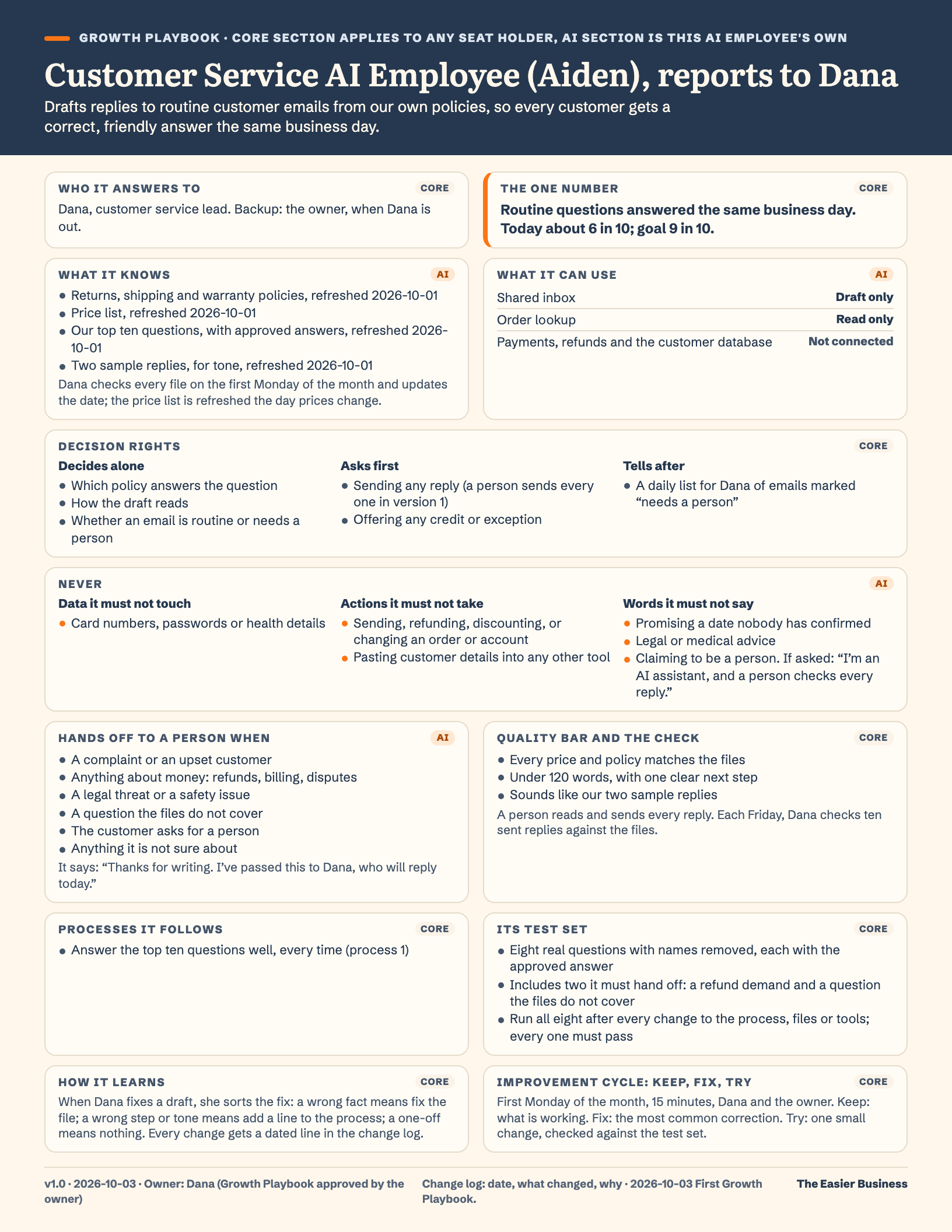
Craig builds Aiden live, drafting replies from a company's own policies. You write the same one-page Growth Playbook for your own AI employee.
Customer Service AI Employee (Aiden), reports to Dana.
- What it does
- Drafts replies to routine customer emails from our own policies.
- What it never does
- Sends, refunds, discounts, or claims to be a person.
- Who checks its work
- A person reads and sends every reply. Each Friday, Dana checks ten sent replies against the files.
See all of Aiden's page
Every line of Aiden's Growth Playbook, the example Craig builds on screen. Yours carries your own AI employee's name and job.
- Name and seat
- Customer Service AI Employee (Aiden), reports to Dana. Its seat: customer service.
- Its one job
- Drafts replies to routine customer emails from our own policies, so every customer gets a correct, friendly answer the same business day.
- Who it answers to
- Dana, customer service lead. Backup: the owner, when Dana is out.
- Processes it follows
- Answer the top ten questions well, every time (process 1).
- Decision rights
- Decides alone: which policy answers the question, how the draft reads, and whether an email is routine or needs a person. Asks first: sending any reply (a person sends every one in version 1) and offering any credit or exception. Tells after: a daily list for Dana of emails marked “needs a person”.
- Quality bar and how its work gets checked
- Every price and policy matches the files. Under 120 words, with one clear next step. Sounds like our two sample replies. A person reads and sends every reply. Each Friday, Dana checks ten sent replies against the files.
- The one number that shows it is helping
- Routine questions answered the same business day. Today about 6 in 10; goal 9 in 10.
- How it learns
- When Dana fixes a draft, she sorts the fix: a wrong fact means fix the file; a wrong step or tone means add a line to the process; a one-off means nothing. Every change gets a dated line in the change log.
- Its improvement cycle
- First Monday of the month, 15 minutes, Dana and the owner. Keep: what is working. Fix: the most common correction. Try: one small change, checked against the test set.
- Its test set
- Eight real questions with names removed, each with the approved answer. Includes two it must hand off: a refund demand and a question the files do not cover. Run all eight after every change to the process, files or tools; every one must pass.
- Version and owner
- v1.0, October 3, 2026. Owner: Dana (Growth Playbook approved by the owner).
- What it knows
- Returns, shipping and warranty policies; price list; our top ten questions, with approved answers; two sample replies, for tone. Dana checks every file on the first Monday of the month and updates the date; the price list is refreshed the day prices change.
- What it can use
- Shared inbox: draft only. Order lookup: read only. Payments, refunds and the customer database: not connected.
- Never does
- Data it never touches: card numbers, passwords or health details. Actions it never takes: sending, refunding, discounting, or changing an order or account; pasting customer details into any other tool. Words it never says: promising a date nobody has confirmed; legal or medical advice; claiming to be a person. If asked: “I’m an AI assistant, and a person checks every reply.”
- When it hands off to a person
- A complaint or an upset customer; anything about money: refunds, billing, disputes; a legal threat or a safety issue; a question the files do not cover; the customer asks for a person; anything it is not sure about. What it says: “Thanks for writing. I’ve passed this to Dana, who will reply today.”
What you leave with
One AI employee, doing one real job, with a person checking its work.
Bring the process you already have. Craig helps you hand it to your AI employee in the AI tool you already use, and you leave with it working.
- An AI employee doing one real job, in the AI tool you already use.
- Its name, in our house style: “Customer Service AI Employee (Aiden), reports to Dana.”
- A one-page plan in plain English: its job, and who checks its work.
- A 15-minute monthly review on your calendar, so it keeps getting better.
The customer wrote
Jordan Reyes9:12 am
Can I return the blue mug?
Hi! I ordered the blue stoneware mug last week and it's still in the box, never used. It's a little smaller than I pictured. Can I send it back?
Aiden’s reply Draft, not sent
Re: Can I return the blue mug?
Hi Jordan,
Thanks for writing, and sorry the mug isn't quite what you pictured. Yes, you can send it back: we take returns within 30 days of delivery, as long as the item is unused, so you're well within that.
From your returns policy: 30 days, unused
Just reply with your order number and we'll email you a return label. Once the mug is back with us, Dana will take care of your refund.
Thanks, Aiden (AI assistant), with Dana Hollow Oak Pottery
Dana’s choices: approve and send, edit, or send back with a note.
Approve all routine replies like this. Once you turn this on, returns inside your policy send without waiting. You still see each one after it goes, and you can turn the rule off any time.
Aiden works in Claude with your Gmail connector and saves each reply to your Drafts folder. Nothing sends until you approve.
When it works
What changes when your AI employee starts work. You approve along the way.
Three examples, each before, while your AI employee learns, and after. While it learns, you approve every message before anything sends. In the workshop you build one of your own, for the job that keeps landing on your desk.
Example: made-up names, companies and numbers
Your inbox
Inbox AI Employee (Aria), reports to you
Sorts the inbox by your rules, drafts the routine replies, and shows you only what needs you.
Before
1,823 unread. A client has followed up twice, a quote is waiting, and a renewal is due on Friday.
Inbox1,823 unreadComposeInbox1,823StarredSnoozedSentDraftsPrimary1,823Promotions48 newUpdates112 newBrightline Supply7:12 amOverdueReminder: invoice 2291 is 15 days overdue – Our records show a balance of $1,240 that was due onPriya Shah6:58 amNo reply 7 daysFollowing up again: install date? – Just checking in a third time. We need to tell our patientsMark DelgadoYesterdayNo reply 4 daysRe: Quote for the Elm Street remodel – Any update on the numbers? We have to decide by FridayHarbor SoftwareYesterdayYour annual plan renews in 3 days – Your plan renews on Friday at $1,188 unless you change itDepartment of RevenueOct 2Notice: quarterly sales tax return due Oct 20 – This is a reminder that your return for the periodTeam calendarOct 2Invitation: Vendor review, Thu 10:00 am – You have been invited to the following eventParcel ExpressOct 1Out for delivery: 2 packages – Your packages are on the truck and will arrive todayMain Street Business WeeklyOct 1This week: hiring, pricing and the fall rush – Plus three owners on what they would do differently1–50 of 1,823While it learns
Aria works in a window of its own, not inside your mail app: Aria files by your rules and saves replies to your Drafts folder. You approve each one before it goes.
Inbox AI Employee (Aria)2 questions for youToday in your inbox1,204filed by your rulesReview3replies drafted and saved to your Drafts folderReview2questions for youReviewIn Drafts · waiting for your OKRe: Quote for the Elm Street remodel · to Mark DelgadoHi Mark, sorry for the wait. The revised quote is attached: $18,400, start in two weeks. Happy to walk through it on a call.Approve and sendEditDraftTo: Mark DelgadoRe: Quote for the Elm Street remodelSendDraftTo: Priya ShahRe: Following up again: install date?SendDraftTo: Brightline SupplyRe: Reminder: invoice 2291SendSend from your Drafts folder, or tell your AI employee to send.Nothing is sent until you approve it.Works with Claude, through its email connectorAfter
Five messages that need you. Everything else is answered with your OK, filed, or waiting for later.
Inbox5 need youComposeInbox5StarredSnoozedSentDraftsClientsBillsTaxesCan wait1,204Primary5PromotionsUpdatesMark Delgado9:20 amRe: Quote for the Elm Street remodel – Looks good, we're in. When can your crew start?Elena Vasquez9:14 amSigned proposal attached – Here it is, signed. Looking forward to the spring plantingDepartment of RevenueOct 2Notice: quarterly sales tax return due Oct 20 – On your calendar for Oct 15Your accountant8:30 amTwo questions before the quarter closes – Can you confirm the equipment purchase date andPayroll7:40 amThis week's payroll is ready for your review – Please review and approve by 3 pm Thursday37Replies sent with your OK1,781Filed by your rulesMonthly review: 15 minutes, on your calendar.Automated up to the handshake: you approve, it sends.
An email arrives
What type is it?
- Needs youA client decision, money or a relationship goes to: Your short inbox, with a drafted reply waiting for your OK
- Transactional or routineA receipt, scheduling, a status question goes to: Delegated: it drafts or handles it, and you approve the handshake
- ReferenceA newsletter, an FYI, a confirmation goes to: An archive folder, still searchable
- Spam or junkScams, junk mail, unknown bulk senders goes to: Leaves the inbox for the spam folder
Meeting follow-up
Follow-Up AI Employee (Alina), reports to you
Drafts the follow-up after every meeting and suggests times, so nobody waits 60 days to hear back.
Before
Twenty-three people you meant to follow up with, the oldest 75 days ago. Closed revenue is flat.
Closed this quarter Example$41,6002 meetings booked this monthFollow-ups due23 overdueMarcus T., Copperline ElectricMet at the trade show · wants a quote75 days overdueGrace L., Fernwood StudioIntro call · asked for pricing62 days overdueSam O., Oak & Anchor CafeDemo done · deciding in a few weeks48 days overdueTom B., Summit RoofingReferral from Elena33 days overdue+ 19 moreWhile it learns
After each meeting, Alina drafts the follow-up and suggests times. You approve, edit or skip.
Closed this quarter Example$41,6006 meetings proposed, waiting for your OKFollow-ups5 drafts readyDraft follow-up · waiting for your OKTo: Marcus T., Copperline ElectricHi Marcus, thanks again for stopping by our booth. Here is the quote we talked about. Could we walk through it together?Suggested times: Thu 10:00 am · Fri 2:30 pmApprove and sendEditSkipGrace L., Fernwood StudioDraft ready · pricing and two timesNeeds your OKTom B., Summit RoofingSent with your OK · meeting Tue 11:00Meeting setNothing is sent and no meeting is booked until you approve it.After
Two follow-ups overdue instead of 23, more meetings booked, and more revenue closed.
Closed this quarter Example$68,900Up from $41,600Pipeline2 overdueMeeting set 2Copperline Electric$18,000Fernwood Studio$6,500Proposal sent 2Oak & Anchor Cafe$12,800Summit Roofing$24,000Won 2Harbor Lane Florist$9,600Cedar Ridge Dental$15,4009Meetings this month2Overdue follow-upsEvery follow-up went out with your OK.Automated up to the handshake: you approve each follow-up, it sends and books.
Getting paid: invoice follow-up
Receivables AI Employee (Amir), reports to you
Drafts polite reminders for overdue invoices, firmer as they age, and hands the hard ones to a person.
Before
Nine invoices past 30 days, four of them past 60. $28,500 is waiting to come in, and nobody has had time to chase it.
Aging report9 invoices past 30 days$53,100Total outstanding$28,500Past 30 daysInvoice 1042 · Copperline Electric$3,900 · due 97 days agoOver 90Invoice 1057 · Fernwood Studio$5,200 · due 71 days ago61–90Invoice 1078 · Summit Roofing$2,600 · due 38 days ago31–60+ 6 more past 30 daysWhile it learns
It drafts each reminder by your rules: friendly first, firmer at 60 days, and a call from you at 90.
Reminders8 drafts need your OKDraft reminder · waiting for your OKTo: Sam O., Oak & Anchor CafeHi Sam, just checking this reached you: invoice 1063 for $4,600 was due six weeks ago. The payment link is below. Thank you!Approve and sendEditSkipInvoice 1042 · Copperline ElectricOver 90 days · flagged for your callYour callInvoice 1057 · Fernwood StudioFirmer reminder draftedNeeds your OKInvoice 1071 · Juniper Physical TherapySent with your OK · promised FridayPromisedNothing is sent until you approve it.After
Nothing past 60 days and eight of the nine paid. One invoice past 30 is still open, because you still depend on others paying.
Aging report0 past 60 · 1 past 30$28,400Total outstanding$2,600Past 30 daysInvoice 1042 · Copperline Electric$3,900 · paid after your callPaidInvoice 1057 · Fernwood Studio$5,200PaidInvoice 1078 · Summit Roofing$2,600 · second reminder queued for your OK31–608 of 9 paid · every reminder went out with your OK.Automated up to the handshake: you approve each reminder, it sends, and the hard calls stay yours.
Who you become
From doing the work to leading the team.
One seat, four ways to fill it: an employee, a contractor, a third-party company or an AI employee. You choose who fills each seat. That is what leaders do. Once you know how to hire one, you can hire a whole department.
Your seat
Pick a start date.
One ticket, Build It, the live workshop: both live sessions on Zoom, your named AI employee built live, its one-page Growth Playbook written in the room, and two filled examples.
Every new hire gets a trial. So do you.
Come to session 1. If it is not for you, write to us before session 2 and we refund the ticket in full.
- For owners ready to hand off one real job.
- Not for a company that wants AI to replace its people.
Can't make these dates?
Join the list and we'll email you when the next round opens.
Email us to join the listQuestions owners ask.
Do I need to be technical?
No. If you can write an email and log in to an AI tool, you can do this. Craig shows every step on screen, in plain English.
Which AI tool do I need?
The one you already use: ChatGPT, Claude or Gemini. Bring your login. Any subscription for your AI tool is yours to keep and pay for.
Is it interactive?
It's live on Zoom and taught on Craig's screen while you build along on yours. The chat opens at set points for questions and for sharing your AI employee's name. There are no breakout rooms and nobody shares their screen, so you can focus on your own build.
What if I can't make one of the sessions live?
Each session is recorded and you get the replay of your own round, so you can catch up before the next session. If neither date works, join the list and we'll email you when the next round opens.
How many people are in the room?
Up to 95 owners a round. You build on your own screen, so the room's size never slows your build down.
Will this replace my people?
No. Choosing AI is not choosing against people. It's quite the opposite. Your AI employee takes the minutiae off someone's plate, and a person always checks its work.
Can my chamber of commerce host a round?
Yes. A chamber can host a round for its members at member prices, with at least 20 paid seats. Write to us at hello@theeasierbusiness.com and we'll set it up.
When you want more
Easy, Easier, Easiest.
This workshop is the Easy step: you build it yourself, with Craig. When you want us side by side with your team, or your whole business mapped, those are the next two steps.
See every way we helpSee the Side by Side Workshop
Not ready yet? Start free:Find the BlockThe nine free cards
Your first AI employee is three hours away.
Next: Tuesday, November 17, 1 pm Eastern.
Nothing about the pile changes on its own. Three hours does.